
Clone Builders Clone Crew: What Your Clones Do on a Build
How the Clone Builders clone crew works: NPC clones place, resize, move, and assemble parts from your prompt in real time — plus the menus that show crew activity.
Quick answer
The clone crew in Clone Builders is the NPC clones that do the building for you: you give them an idea and a location, and they place, resize, move, and assemble parts into a finished creation through a structured building system — the official game page states Clone Builders does NOT use AI for builds.
- Clone Builders is an experimental building sandbox on Roblox by Synoptic Interactive, built around giving a target to the builder system.
- Official framing: give your clones an idea and watch them get to work — you give the challenge, and the clones figure it out.
- Clones are NPC builders that respond to player-directed challenges. Their work can vary depending on the project, so give a clear objective and adapt to what they create.
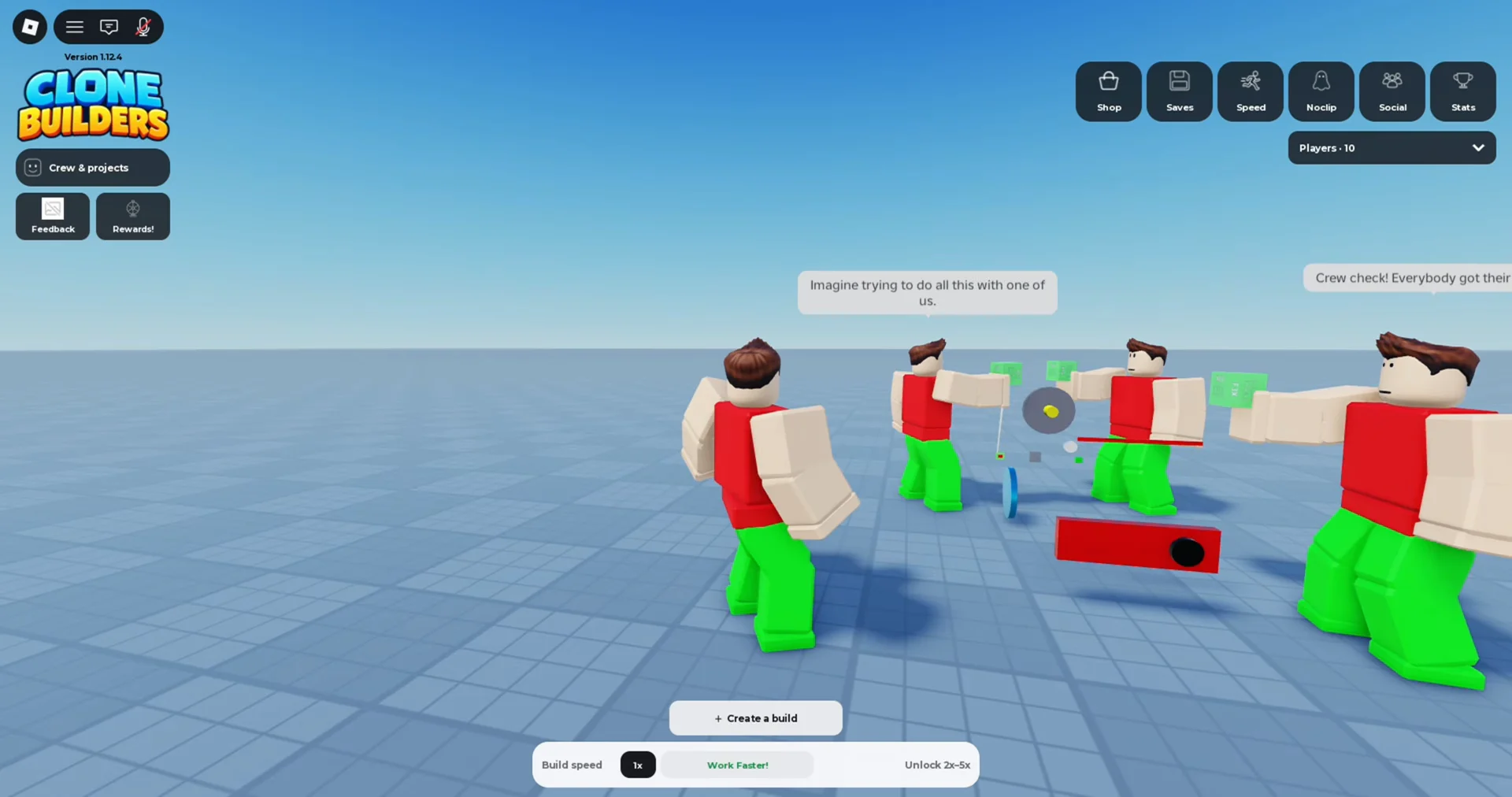
How clones work on an active build
Crew work runs directly on the active build project. Instead of placing anything yourself, you write a prompt and select a location; walkthroughs show three clones assigned to the job, collecting the pieces and putting the model together in real time while you walk around and inspect their work. Construction is gradual: clone workers construct projects over time instead of completing every project instantly, and large or detailed creations may require extended construction time, especially when several parts are being assembled. Within the build, clones work from the build idea you give them — they handle individual parts, combine them into larger sections, and assemble the final structure.
Clone behavior after receiving a job
A player behavior guide (updated September 24, 2026) frames clone behavior as the set of rules that determines how a clone reacts after it receives a task: it may remain idle, move toward a work area, perform a construction action, respond to danger, assist another unit, or return to a recovery state. Of those states, the idle → move-to-work-area → construction-action path is the one consistent with the documented structured building system; treat the others as that guide's framing rather than the game's official description. The same guide recommends giving each clone one clear primary role, keeping construction routes free of unnecessary obstacles, placing common materials near active build zones, and testing new structures before assigning additional tasks.
Crew management surfaces during a build
Several in-game surfaces show what the crew is doing while a build runs. These labels come from player walkthroughs, and the official page calls the game constantly evolving — recheck them in-game if clone systems change.
Checklist
- Crew management window
Shows each clone's status while work is underway, with states such as CLONE 1: BUILDING for each active worker, along with a live piece counter for the model.
- Unassign / Deassign
Pull a single clone off a task mid-build from the same window.
- Deassign all
Clear the whole crew at once.
- Queued tab
Queued builds wait here until clones are free.
- HUD while the crew works
You can move around the server and inspect what other players are constructing; the HUD includes Speed, Noclip, Tools/Edit, Minigames, and Saves.
What the player does while the crew builds
Redeem steps
- Give one clear prompt with open placement
Give one clear subject as the prompt and place the project where the workers can move around it — avoid tight corners, walls, and areas occupied by another build, since open placement gives clones room to work.
- Confirm the crew has started
Start the project and look for signs that the clones have begun working; if the build appears small, first determine whether the system is still processing the request before canceling.
- Keep the work zone clear
During construction, watch progress and keep the clone work zone and access points clear so builders can complete the plan — crowded placement makes it hard to inspect the result or identify problems.
- Stay near your first few builds
Watching how the clones interpret a prompt teaches the difference between a clear instruction and one that is too vague or complicated, and construction continues while you observe or move around nearby areas.
When the crew looks stalled or inactive
The most common early mistake is assuming that a slow build has failed. Large or detailed creations may require extended construction time, especially when several parts are being assembled. Before restarting, inspect the workers, the project perimeter, and any visible progress, and ask: Is the project visibly changing? Are clones still assigned to the build? Would waiting reveal more than restarting?
Comparison
| Observation | Likely reason | Recommended response |
|---|---|---|
| Build takes too long | Project is large or detailed | Wait, inspect progress, and avoid stacking jobs |
| Workers seem inactive | Job may be queued or still processing | Check the project before canceling |
| Clone stays idle | No valid task or unavailable target | Confirm assignment and target state |
| Clone waits near a structure | Missing material or access | Check supply route and build range |
| Clone abandons construction | Higher priority interruption | Review defense and task rules |
Rows covering materials, defense, and task rules mirror the player-guide framing described above; the behavior consistently documented is that assigned clones move to the work area and construct on the project you started.
Related Guides
Crew Status: Reading Each Clone's Activity
Decode every label in the Crew window, from CLONE 1: BUILDING to live piece counts, and see which details stay unverified.
More Clones: Increasing Clone Capacity
Grow past the default crew of three: use the plus controls or More Clones to raise capacity and manage the Crew window.
Unassign Clones: Remove or Clear the Crew
Free up workers mid-build: remove one clone or clear the whole crew with Unassign, Deassign, and Deassign all.